
Get back to the right tab
without scanning the tab bar.
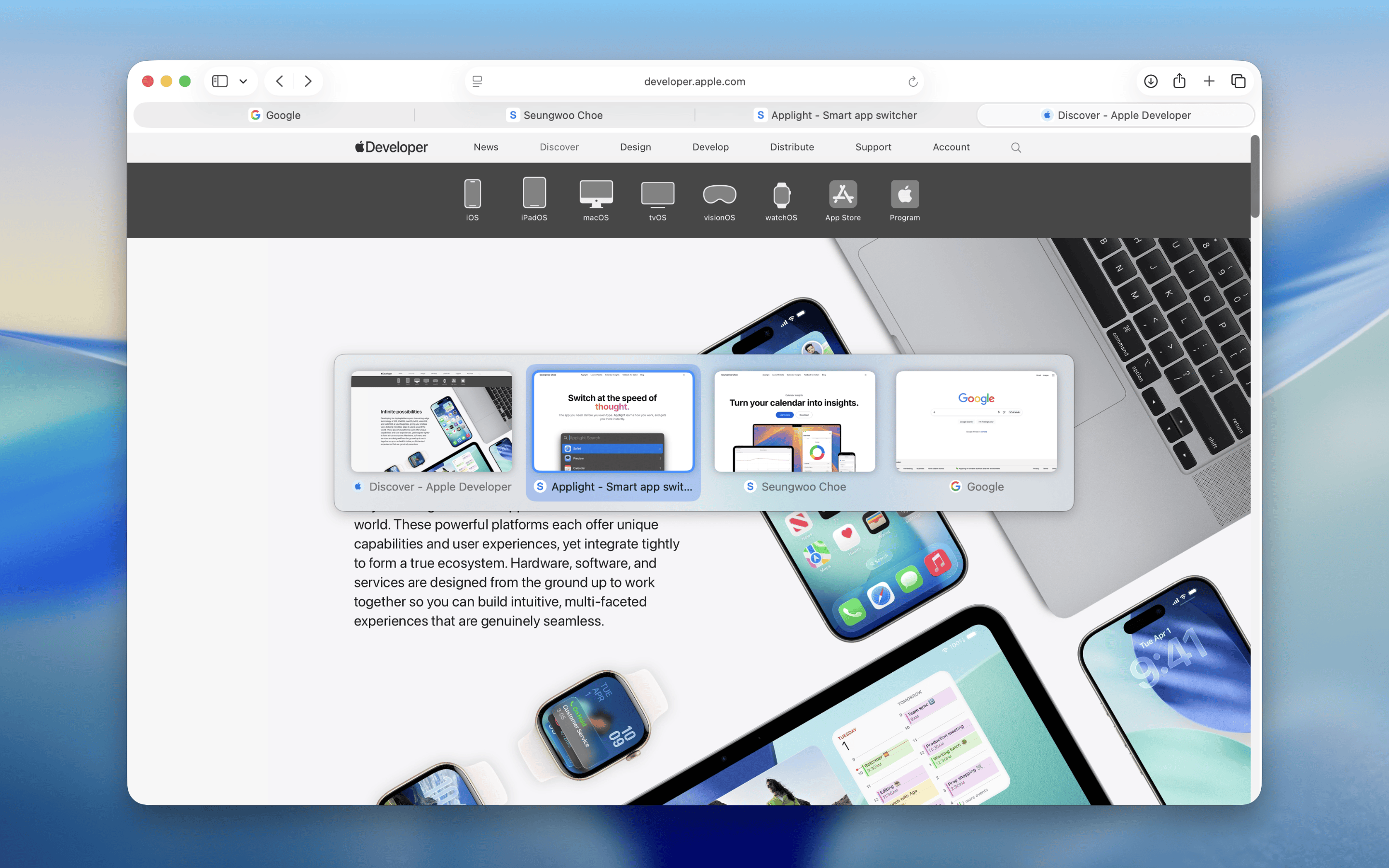
TabBack gives Safari the recent-tab switching it has been missing. Jump straight to the tab you just used, cycle through tabs in most-recent order, and switch with confidence using visual previews.
See it in action
A faster way back to the tab you actually want.
TabBack keeps your recent Safari tabs within reach, so switching feels closer to Command-Tab than a scavenger hunt across a packed tab bar.
Why TabBack
Crowded Safari tabs break your flow.
Research, docs, tickets, email, and reference pages all end up in one window. TabBack cuts through that clutter by putting your recent tabs back on the keyboard, in the order your brain expects.Recent tabs stay first
Instead of scanning titles from left to right, move through the tabs you were just using in the order your brain expects.
The shortcut becomes automatic
Press once to jump back, or hold the modifiers and tap through your recent tabs when you are comparing pages.
You can see before you switch
Visual previews and site icons make it easier to land on the right page without trial and error.
Built for daily Safari use
Everything that makes switching feel immediate
TabBack focuses on one job: getting you back to the right Safari tab quickly, clearly, and without compromising privacy.
Most-recently-used order
Tabs appear by recency, so the one you want is usually first or very close to it.
Quick switch and cycle
Press once to go back, or keep the modifiers held down to cycle through recent tabs in sequence.
Reverse when you overshoot
Use a reverse shortcut to step back the other way when you pass the tab you wanted.
Visual previews
Preview thumbnails and site icons before switching, so you can choose the right page at a glance.
Private by design
Everything runs on your device. No tracking, no analytics, and no browsing data sent anywhere.
Try it with TabBack Lite
Start with the Lite version on the App Store if you want to feel the workflow before committing.
Proof from users
The payoff shows up right away.
Less tab hunting, fewer interruptions, and a Safari workflow that feels faster from the first shortcut.
"So simple but worth so much. Saves time and annoyance."
petehl
Australian App Store
"Finally an extension that works for Safari. I just can't live without it!"
Wilsoncelf
Brazilian App Store
"A must have app if you jump between tabs frequently."
Vkrzz
Indian App Store
Stop losing time to crowded Safari tabs.
Download TabBack and bring recent-tab switching, visual previews, and private on-device operation to your Safari workflow.